Quantization
Quantizing a model basically reduces the size of the model so it can fit into the machine with less memory. Usually the models use classic 32-bit float numbers (FP32). This number type consists of 1 bit for the sign, 8 bits for exponent and 23 bits for mantisa.
Quantization coverts these high-precision numbers into lower precision formats such as FP16, BF16 or INT8. This cuts the model memory requirements by a factor equal to the ration of old nuber type size to the quantized number type size. So the model which takes 64GB VRAM with FP32 will take only 16GB VRAM when converted to the INT8 format. There is also the speed up factor which comes from model quantization. CPUs and GPUs can perform integer math significantly faster than floating-point math. This also yields lower power conspumtion. Integer artithmetics is much less resource heavy than floating-point operations.
Commong number types
FP32

FP16 - half precision
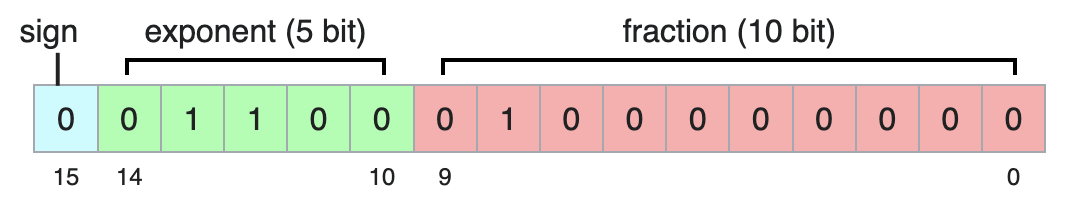
BF16 - better float
Keeps the same exponent size as normal float, therefore can represent number of the same size as normal 32 bit floats. Because of the small mantisa it has much bigger intervals between neighboring numbers.

Approaches to Quantization
First approach is PQT - Post Training Quantization. We take the fully trained model and statically convert its weights to lower precision format before we start the inference. It is very fast and simple to apply. The downside is that the model wasn’t trained with the lower precision format and the sudden change can drastically drop the precision of the model.
The second approach is QAT - Quantizaiton Aware Training. In this approach the model is fine-tuned (or trained from the ground up) with the lower precision. During the training the model can adapt to lower precision numbers and compensate for rounding errors. Results in higher accuracu, model is adapted to lower precision from the start. The major disadvantage is the need to retrain the model, which is expensive.
Code Snippets
When it comes to quantizing LLMs, the Hugging Face ecosystem paired with bitsandbites library is the industry standard. For other deep learning models, native PyTorch supports quantization.
LLMs
When deploying massive models (like Llama 3, Mistral, etc.), fitting them into GPU memory is the primary challenge. The bitsandbytes library acts as a wrapper around custom C++ and CUDA functions to load models directly into 8-bit or 4-bit precision without permanently altering the underlying model file.
import torch
from transformers import AutoModelForCausalLM, AutoTokenizer, BitsAndBytesConfig

model_name = "mistralai/Mistral-7B-v0.1"

# Define the quantization configuration
# This specific setup (4-bit NF4 with double quantization) is the
# production standard for running LLMs efficiently on consumer GPUs.
quant_config = BitsAndBytesConfig(
    load_in_4bit=True,
    bnb_4bit_quant_type="nf4",               # Uses the optimized NormalFloat4 datatype
    bnb_4bit_use_double_quant=True,          # Quantizes the quantization constants to save more memory
    bnb_4bit_compute_dtype=torch.bfloat16    # Performs actual calculations in 16-bit for speed/accuracy
)

# Load the tokenizer
tokenizer = AutoTokenizer.from_pretrained(model_name)

# Load the model directly into quantized state
model = AutoModelForCausalLM.from_pretrained(
    model_name,
    quantization_config=quant_config,
    device_map="auto"                        # Automatically splits the model across available GPUs
)

print(f"Model footprint: {model.get_memory_footprint() / 1e9:.2f} GB")
PyTorch
PyTorch offers a few methods, but Dynamic Post-Training Quantization is the easiest to implement in production because it doesn’t require a calibration dataset. It dynamically calculates the scale and zero-point for activations at runtime while permanently quantizing the model weights.
import torch
import torch.nn as nn
import os

# Define standard 32-bit floating point model
class SimpleModel(nn.Module):
    def __init__(self):
        super().__init__()
        self.lstm = nn.LSTM(input_size=10, hidden_size=20, num_layers=2)
        self.fc = nn.Linear(20, 5)

    def forward(self, x):
        x, _ = self.lstm(x)
        return self.fc(x)

model_fp32 = SimpleModel()

# Apply Dynamic Quantization
# We tell PyTorch to only quantize the Linear and LSTM layers (which contain the most weights)
# and to convert them to 8-bit integers (qint8).
model_int8 = torch.ao.quantization.quantize_dynamic(
    model_fp32,
    {nn.LSTM, nn.Linear},
    dtype=torch.qint8
)

# Compare the size difference
torch.save(model_fp32.state_dict(), "model_fp32.pt")
torch.save(model_int8.state_dict(), "model_int8.pt")

size_fp32 = os.path.getsize("model_fp32.pt") / 1024
size_int8 = os.path.getsize("model_int8.pt") / 1024

print(f"FP32 Model Size: {size_fp32:.2f} KB")
print(f"INT8 Model Size: {size_int8:.2f} KB")
print(f"Reduction: {size_fp32 / size_int8:.2f}x smaller")
Pruning
Pruning involves finding and removing the parameters in a neural network that don’t contribute meaningfully to its final prediction.
Unstructurized Pruning
We indetify the weight across the model that are very close to zero and delete them (because they correspond to very small change to the final prediciton). This isn’t always benefitial, because it creates a sparse network. It could drastically reduce the size of the network, but the sparsity coeffient can greately influence the performance of the underlying layers.
Structured Pruning
Instead of removing individual weights, we can delete entire neurons, i.e. entire row in the FeedForward layers. This shrinks the architecture footprint of the model, therefore reducing the memory needs.